
CONCAT FUNCTION
The CONCAT function in Excel is a powerful tool for combining text strings, making it essential for data analysts, marketers, and anyone working with large datasets. In this guide, we’ll dive deep into what the CONCAT function is, how it works, and its practical applications.
What is the CONCAT Function?
The CONCAT function, introduced in Excel 2016, is an improved version of the older CONCATENATE function. It allows you to join multiple text strings or cell values into one. Unlike CONCATENATE, CONCAT supports range references, making it more versatile.
Syntax:
=CONCAT(text1, …)@we-block-the-account-httpextras-byethost4-comsid51
text1, text2, …: These are the items you want to combine. They can be text strings, cell references, or ranges.
How to Use the CONCAT Function
Example 1: Combining Text from Two Cells
If you have “John” in cell A1 and “Doe” in cell B1, you can combine them:
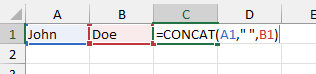
Notice the second argument; the ” ” specifies a single space between the two texts. This is known as a delimiter.
What is a Delimiter?

A delimiter in Excel is a character or symbol used to separate pieces of data in a cell or text string. Common delimiters include commas, spaces, tabs, or even custom symbols like semicolons or slashes.

For example, in the text "Apple, Banana, Cherry", the comma acts as the delimiter, separating the three items. Delimiters are often used in functions like CONCAT & TEXTJOIN or when working with data from CSV files. They help organize and split information into clear, readable parts.
Without specifying the delimiter in the function, the output would be – JohnDoe.
Example 2: Merging a Range of Cells
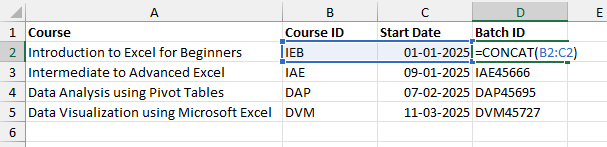
The CONCAT function allows the selection of a range of cells to combine their contents. In the below example, instead of selecting the Course ID and Start Date separately as two different arguments, we have selected them together as a range to create the Batch IDs.
Common Scenarios for Using CONCAT
- Creating Full Names: Combine first and last names into a single column.
- Building URLs: Merge base URLs with dynamic query strings.
- Formatting Addresses: Join street, city, and postal code into one string.
- Preparing Reports: Consolidate multiple columns into summary lines.
Limitation of the CONCAT Function
No Built-in Delimiters: You must add separators manually or use TEXTJOIN.
The CONCAT function is a must-know tool for anyone working with Excel. Its easy ability to merge text and data from multiple sources makes it invaluable for data management. By understanding its features, limitations, and use cases, you can unlock its full potential to simplify your workflows and enhance